CTC
212 - Lecture 10 (Element Modification)
|
Modify Elements |
|
|
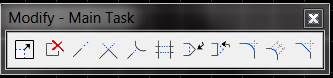
Modify element |
Box 1 - Make an element larger or smaller |
|
Partial delete |
Box 2 - Deletes a portion of an element (select start & end points) |
|
Extend element |
Box 3 - Extend element graphically (or by +/- key-in) |
|
Extend elements to intersection |
Box 4 - Intersect 2 lines |
|
Extend element to intersection |
Box 5 - Extend line to an element |
|
Trim element |
Box 6 - Trims part of element that extends beyond a cutting edge |
|
Insert vertex |
Box 7 - Insert a vertex (turn triangle into a rectangle) |
|
Delete vertex |
Box 8 - Delete a vertex (turn rectangle into a triangle) |
|
Circular Fillet |
Box 9 - Identify radius. Truncate none, single, or both |
|
Parabolic Fillet |
Box 10 – Identify
distance. Truncate none or both.
Symmetric or horizontal. |
|
Chamfer |
Box 11 - Identify distance 1 & 2 (both equal for 45 deg chamfer) |
|
Creating Complex Shapes/Chains and Regions |
|
|
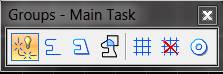
Dropping Complex Status |
Box 1 - Drops complex status of chains, shapes, fonts, dimensions, multi-lines, etc. |
|
Create Complex Chain |
Box 2- Method: Manual or Automatic |
|
Create Complex Shape |
Box 3 - Method: Manual or Automatic |
|
Create Region |
Box 4 - Union, intersection, or difference |
|
Add to Graphic Group |
Box 5 |
|
Drop from Graphic Group |
Box 6 |
|
Dropping Graphic Group Elements |
Settings, Locks, Graphic Groups (turn on/off). Other software creates complex graphic groups (Inroads-DTM triangles, Stationing Graphic Groups (tics, stations, etc.) |
|
Multi-Lines (Tools, Multi-line); Element, Multiline for settings |
|
|
Placing Multi-lines |
Box A1 |
|
Match Multi-line attributes |
Box B1 |
|
Change |
Box B2 |
|
Drop |
Box B3 |
|
Construct Closed Cross Joint |
Box C1-See Figure 8-49 on page 337 |
|
Construct Open Cross Joint |
Box C2 |
|
Construct Merged Cross Joint |
Box C3 |
|
Cut Single Line |
Box C4 |
|
Cut All Component Lines |
Box C5 |
|
Construct Closed T Joint |
Box C6 |
|
Construct Open T Joint |
Box C7 |
|
Construct Merged T Joint |
Box C8 |
|
Construct Corner Joint |
Box C9 |
|
Uncut Component Lines |
Box C10-Undoes a cut |
|
Multi-line Partial Delete |
Box C11 |
|
Move Multi-Line Profile |
Box C12 |
|
Edit Multi-Line Cap |
Box C13-Edits end caps (none, current, active, joint) |
