CTC 112 - Lecture 12 (Patterning)
|
Patterning |
|
|
Annotate,
Patterns |
|
|
Associative
Patterns |
If on, pattern is associated
with element. If element changes, pattern changes |
|
Patterning
Methods |
Element, fence, intersection,
union, difference, flood, points |
|
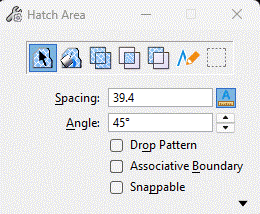
Hatch Area |
Hatch area with one set of
parallel lines |
|
Crosshatch
Area |
Hatch area with 2 sets of
parallel lines |
|
Attach Cell
Library (Patterns) |
Download
Archpa.cel
(use IE; save target as) |
|
Pattern Area |
Pattern area with a cell (try
patterning rectangle with ranrbl) |
|
Leaving
Holes in Patterns |
Change fill type to hole;
associative pattern must be turned off |
|
Linear
Pattern |
|
|
Show Pattern
Attributes |
|
|
Match
Pattern Attributes |
Change pattern attributes to
match an existing pattern |
|
Change
Pattern |
Change a pattern |
|
Delete
Pattern |
Delete a pattern |

|
Filling An Element with Color |
|
|
Viewing Fill
Color |
Settings, view attributes |
|
Filling
element with color |
File type: Opaque or
Outlined |
|
Changing
Fill type of Existing Element |
Change Attributes tool box, 3rd
box |
|
Fill Element
with Color |
Change fill color for fill
types: -opaque (fill and outline) -outlined (fill only);
outline is in active color |