Copyright Association of Teachers of Technical Writing Winter 2005| [Headnote] |
| Composing hypertext documents can be an enriching path into the world of technical communication. In learning to produce hypertext, students are introduced to an important form of written composition that encompasses not only text generation, but also visual communication and information architecture. In this article, I provide a rationale for teaching hypertext composition and then some specific curricular suggestions in two parts, one for teaching beginners, and one for teaching more advanced students. |
WHY COMPOSE HYPERTEXTS?
Student writers can benefit in several important ways from being taught to compose hypertexts. First, they can benefit simply from knowing how to produce a kind of writing that is now deeply embedded in our culture. Web sites have become the public voices of most organizations and institutions, online reference and help systems have become the primary sites of information retrieval for researchers and many others, and the delivery of a wide spectrum of publications in electronic form-often with hypertextual features-is becoming increasingly commonplace. By learning how to produce these types of documents, students will be better able to fulfill the needs of readers in this constantly expanding docuverse.
Learning to compose hypertexts can also encourage students to engage problems of visual rhetoric directly and intensively. Although any text, paper or electronic, can be studied in terms of the rhetorical import of its visual presentation, hypertextual documents provide especially dynamic and dramatic examples of how the visual and the rhetorical work together. In many of the hypertexts we encounter on the Internet, for example, we find passages of text arranged and styled in rhetorically significant ways, as well as bits of text serving as navigational tools (menus, navigation bars, inline links, etc.). We also find nontextual material serving many rhetorical purposes, such as illustrating the page's textual statements (photos and diagrams), indicating the page's position within a larger structure (framing devices such as persistent logos and design elements), and pointing outward to sites not directly relevant to the page's content (advertisements). Students can benefit not only from interpreting these complex visual artifacts, but also from being asked to produce them.
One of the distinctive features of hypertext documents, the interactive link, can be an especially powerful example of the problems of visual rhetoric. The interactive link, or hyperlink, typically is a textual or pictorial item that a reader can click to be taken to another spot in a document or to another document altogether. Often it is simultaneously a visual feature, a navigational tool, and part of the document's textual content. As such, the hyperlink demonstrates in a concrete, visible form the many points at which problems of visual design, information architecture, and text generation intersect one another. Exploring hyperlinks can also be an excellent way to explore both the general concept of intertextuality as well as specific problems of citation, reference, and indexing. (Graham Allen's Intertextuality is a useful introduction to the concept, both in general and in relation to the Internet.)
Finally, composing hypertexts can be an avenue for student writers to learn about some sophisticated features of today's writing technologies. For example, when students have mastered the conceptual distinction between a document's source (e.g., the text file containing HTML tags and declarations) and its rendering (e.g., a Web browser's display of this source document), they are well prepared not only to produce and revise complex hypertexts, but also to work with any document production system in which the source is directly manipulated (e.g., LaTex, XML). Moreover, an understanding of the source-rendering relationship can be a useful base for entering the realm of single-source authoring, because an understanding of the conceptual distinction between source and rendering embodied in markup languages such HTML reflects the foundational distinction between structure and presentation in more complex markup languages, such as XML, and in the use of single-source authoring tools, such as FrameMaker.
For the purposes of this article, I emphasize the teaching of hypertext composition in terms of Web site design. This emphasis is not meant to downplay the importance of other sorts of hypertextual documents, of which there are many. Indeed, the hypertextual docuverse could be said to include any electronic document that permits the reader, by way of a mouse click or other action, to view another portion of that document, a different document altogether, or a file of some other media type (e.g., a video or audio clip). This kind of interactivity is hardly limited to Web pages-the notion of dynamic links that can be clicked with a mouse was first tested in practice over thirty-five years ago (see, e.g., Douglas C. Englebart's demonstration, available online at <http://sloan.stanford.edu/mousesite/1968. Demo.html>), the first popular hypertext authoring systems emerged nearly twenty years ago (e.g., HyperCard and Storyspace), and it is possible today to build interactive links into just about any kind of electronic document.
I focus on the area of Web site design, however, because teaching this sort of hypertext composing seems to be the best way to capture all of the pedagogical benefits just described. For example, in many hypertext authoring systems outside the realm of those based on HTML, the writer does not have direct access to the underlying source document. Yet, having such access is essential to understanding the nature of electronic authoring systems in which the document's structure is considered distinct from its content. In addition, it seems best to introduce students to the notion of intertextuality and the rhetorical possibilities of the interactive link by way of a composing process that permits connections to the whole online docuverse rather than in self-contained hypertexts such as those produced with early authoring systems like StorySpace. It should not be forgotten that college students today spend a great deal of time using the Internet, where the documents they encounter almost always involve complex weavings of textual, pictorial, and navigational material. Teaching them to move beyond the passive reception to the active production of these kinds of documents can serve not only their professional and intellectual needs but their creative interests as well.
Before moving to my specific pedagogical suggestions, I'd like to discuss a bit more the two features of hypertext documents (of the HTML-based, Web page variety) that seem most important for students to understand: the source-rendering relationship and the hyperlink. Getting an initial grasp of the nature and possibilities of these two features should not be difficult for most college students, and having this grasp can serve as the basis for developing a richer and more complex understanding of all of the issues mentioned above.
The Source-Rendering Relationship
If students who are unfamiliar with how Web pages are constructed view a document containing HTML source text and then view its rendered version within a Web browser, they will see that the former bears no direct visual relationship to the latter. They will thus be put in the position of wondering how the two relate to each other, an excellent point of departure for conveying several key concepts in technical communication, such as the following:
Markup systems. One of the first differences anyone will notice between an HTML source text and its rendered version is that the former is a plain text document throughout, whereas the latter contains text styled in various ways. Such stylistic features are marked in the source text by tags defined within the HTML specification (e.g., <strong> implies boldface). HTML is just one among many markup systems, however, and is itself derived from a broader markup system-SGML-that has been in use since the early 1970s (several helpful papers on the origins and early uses of SGML by its inventor, Charles F. Goldfarb, can be found at Goldfarb's Web site, <http://www.sgmlsource.com/history/>). Moreover, even documents composed in Word and InDesign are constructed upon a substrate of source files containing markup; these source files, however, generally are not accessible because they are proprietary, so the author's changes to the document generally do not involve direct manipulation of the markup tags.
Although the term markup is usually used in discussions of electronic documents, the idea reflected in the term can be applied to any kind of document. As Coombs, Renear, and Derose point out:
Whenever an author writes anything, he or she "marks it up." For example, spaces between words indicate word boundaries, commas indicate phrase boundaries, and periods indicate sentence boundaries. This fact is widely ignored; indeed, markup is usually treated as an unfortunate requirement of using electronic text-processing systems, that is, as something to be avoided. A careful analysis reveals, however, that authors regularly use two types of markup in their manuscripts: punctuational, for example, placing periods at ends of sentences; and presentational, for example, numbering pages. Thus, markup cannot be escaped because our writing system requires it. (934),
Markup of any kind, in other words, may be considered an essential component of the "technology" of writing in general, serving a document's rhetorical import by affecting clarity, cohesion, emphasis, navigability, and so forth. Composing HTML-based hypertexts can thus be an especially productive route to understanding the role of markup in all writing. Although the idea of markup can be addressed through the use of "styles" in such programs as Word or InDesign, using an HTML-based system for designing hypertexts allows students to work directly with the markup system itself, in a relatively simple, rule-bound framework.
The principle of hierarchical structure. Authors of HTML hypertexts need to understand how a markup system supplies tags for styling texts as well as how it is used to organize the HTML source document as a whole. HTML authoring, that is, is not merely the tagging of text with formatting instructions, but, more generally, the creation of a hierarchically organized source document in which every element has certain possible properties. Some of these elements are textual and can be tagged with stylistic attributes, but there are many other elements that can take various properties-for example, images can be given size properties.
This principle of hierarchy is of special importance to technical communicators because it embodies the intersection of the computing world in which hypertexts live as data files and the visual-rhetorical world in which hypertexts live as social artifacts. In the computing world, that is, the HTML file is composed of tagged elements (containers) in a hierarchical arrangement, and it resides in a file system that is hierarchically organized. In the visual-rhetorical world, on the other hand, the hypertext document (like all written artifacts) is composed of visual and rhetorical features that can be interpreted in terms of their hierarchical arrangement (e.g., their global and local features).
For pedagogical purposes, simply getting the principle of hierarchical ordering across to student writers can be useful in itself; for one of the best general treatments of the topic, Herbert Simon's 1962 paper "The Architecture of Complexity" is an excellent place to begin. The import of Simon's approach is that hierarchy is all around us and inside us, too, and can serve as a powerful conceptual tool for interpreting our social practices, cultural artifacts, and thinking processes. Within the realm of written composition, the principle of hierarchy is particularly important, because it reflects the abstract structure of most expository prose, both materially (chapters, sections, paragraphs, sentences) and abstractly (general and specific statements, arguments and subarguments, propositions and evidence, etc.).
Although it is essential that new hypertext authors grasp the principle of hierarchical structure, students should also understand that this principle operates in the world of hypertexts along with its complement, the principle of associative connection. Indeed, associative connections are the raison d'etre for many kinds of hyperlinks. However, because all associative links are constructed within a document and file system that is hierarchically organized, it is probably best to emphasize the hierarchical principle first, if only as a practical consideration.
The structure-content distinction. Once students understand how markup systems and hierarchical structure figure into the source-rendering relationship, they are well on their way to understanding the increasingly important distinction between a document's structure and its content. In the world of technical communication, this distinction is central to work in the single-source arena, where authors produce documents whose contents (i.e., textual, pictorial, and navigational material) can be presented in various forms on different kinds of media and for varying audiences and purposes. As several authors have pointed out, the single-source approach is quickly becoming one of the core competencies of technical communication. (see, for example, Michael Albers's "The Technical Editor and Document Databases" and William Hart-Davidson's "On Writing, Technical Communication, and Information Technology").
Rhetorically, the structure-content distinction reflects the important concept of genre. Most technical and professional documents can be classified into one of many familiar genres (e. g., memo, business letter, grant proposal, instruction manual, etc.). All of these genres can be analyzed in terms of their distinctive structural components, and we can easily identify the kinds of content that would be appropriate to each component. Similarly, many web pages are structured in generic ways, depending on the rhetorical genre they reflect (e. g., online storefront, news site, product description, personality profile, etc.). To make the structure-content distinction clear to students learning to compose in hypertext, it can be useful to show how the distinction plays out in both paper- and web-based documents. For example, one could show students a familiar type of web page (say, that of an online retailer) and a familiar genre of paper-based communication (say, a memo), and then ask them to develop a system of structural tags and a corresponding source document for each.
Problem-solving. The source-rendering relationship also has important implications for the problem-solving dimension of technical communication because the presence of both source and rendered versions of hypertext documents adds a layer of complexity to the composing process that is typically not present in the desktop-publishing environment. With an understanding of this complexity, however, comes a high degree of control over both the appearance and the functioning of the hypertext document.
Acquiring this control is key to becoming a sophisticated author of hypertext documents. In the initial design stages, for example, it is important to have a sense of what HTML documents can do (or do easily) and what they cannot do as one develops the textual, pictorial, and navigational features suiting one's rhetorical aims. Such knowledge is essential especially for beginners who may be unaware of some of the basic capabilities and limitations of composing HTML-based documents. Moreover, knowing why features of the rendered version are not looking or acting as one expected is essential to making effective revisions. By developing a persistent awareness of the dynamic relationship between the source and the rendered version-a constant attention to both sides of the dialogue between the what and the why of the hypertext document's structure and behavior-students will be well prepared to solve complex visual and rhetorical problems not only in HTML but in other authoring environments they are likely to encounter as technical communicators.
The Hyperlink
The hyperlink is a deceptively simple feature of hypertext documents. On a Web page, a hyperlink may be textual or nontextual. Hyperlinks can help the reader nav-, igate a document's or site's structure, point the reader to relevant or related material located elsewhere on the Internet, or invoke an audiovisual item of some kind. Hyperlinks thus embody problems of textual rhetoric (links are often short phrases), visual rhetoric (whether textual or not, links must be distinguished visually), and information architecture (links usually take the reader to a different place in a complex information network).
Hyperlinks are typically provided by the author for the reader's use. How useful a link may be for the reader, however, is not a matter over which the author has complete control. As researchers in written composition, such as Armbruster and Schriver, have demonstrated, the author may not always be the best judge of how to organize a document both globally at the level of sections and paragraphs and locally at the level of sentences and phrases to be most useful to readers. The problem of producing links sufficiently useful to the reader thus reflects what composition researchers have called the problem of producing reader-based as opposed to writer-based prose (see, for example, Linda Flower's "Writer-Based Prose"). Such research suggests that composers of hypertexts should work hard to ensure that readers will find a document's hyperlinks genuinely helpful-a problem that Web designers have discussed a great deal lately as a matter of producing user-centered Web documents.
Although it has become almost a universal convention of hypertext writing to produce hyperlinks that are more reader-based than writer-based, the history of the very notion of hypertext betrays an approach to authorship that is far more writer-based than reader-based, in the following sense. Today it is considered good practice to supply readers with links that serve their browsing and navigation needs efficiently and effectively, as McHoul and Roe point out:
These metaphors-browsing, indexing, searching, maps, filters, tours, navigation, etc.-constitute a conventional conceptual reading apparatus. Although the implied function of this apparatus can be read as a bridge or transition between "old" and "new" modes of reading practice (enabled by the rigid definition of print text and the reader's relation to it), it appears more as the overlaying of conventional reading practice on new technology, (sec. 4)
In contrast, the earliest visions of a hypertext reading environment are almost by definition visions of a writer-based composing situation. The purpose of creating links, in these visions, is to allow authors of hyperlinks to draw together documents for their own use, not for an externally defined audience of readers. Here I digress briefly to examine this gap between the oldest envisioned uses for the hyperlink and its typical uses today in some detail, because understanding this historical shift may help us to imagine a wider range of pedagogical applications for hypertext composition.
The two most often-cited visionary statements on hypertext both imagine the use of something like hyperlinks in a way that few contemporary readers have experienced. Vannevar Bush discusses the memex in his 1945 article "As We May Think," published in The Atlantic Monthly. He describes a "sort of mechanized private file and library" that "stores all [the user's] books, records, and communications, and which is mechanized so that it may be consulted with exceeding speed and flexibility." It functions not as a distant, external library, but rather as "an enlarged intimate supplement to [the user's] memory." The memex system involves two components: a kind of terminal and a "repository" for materials to be accessed. The terminal "consists of a desk" upon which one would find "slanting translucent screens, on which material can be projected for convenient reading" as well as "a keyboard, and sets of buttons and levers." The repository stores all of the accessible materials, mostly in the form of microfilm, and can hold a great volume of material. Existing documents as well as new items can be inserted into the repository, because the memex terminal has a device for direct microfilming of "longhand notes, photographs, memoranda, all sorts of thing."
Embodied in this system, Bush explains, is "the essential feature of the memex" -a mechanism for linking together items into a "trail" through the creation of "codes" that index each item as well links among items:
When the user is building a trail, [the user] names it, inserts the name in his code book, and taps it out on his keyboard. Before him are the two items to be joined, projected onto adjacent viewing positions. At the bottom of each there are a number of blank code spaces, and a pointer is set to indicate one of these on each item. The user taps a single key, and the items are permanently joined. In each code space appears the code word... .Thereafter, at any time, when one of these items is in view, the other can be instantly recalled merely by tapping a button below the corresponding code space. Moreover, when numerous items have been thus joined together to form a trail, they can be reviewed in turn, rapidly or slowly, by deflecting a lever like that used for turning the pages of a book. It is exactly as though the physical items had been gathered together from widely separated sources and bound together to form a new book. It is more than this, for any item can be joined into numerous trails.
Such trails, one notices in Bush's scheme, are built by what today we would call the "user" of the texts in the memex. Although such trails can be simulated by users in the contemporary context (through, for example, the creation of one's own hypertextual memex out of existing electronic documents), it is far more typically a distant author who creates the links, leaving to the user the role of clicker or surfer. In this light, one can see Bush's memex system as a kind of tool for creating what would be a distinctly "writer-based" sort of hypertextual document.
The second hypertext visionary relevant here is Ted Nelson, who coined the term hypertext in his 1965 paper "A File Structure for the Complex, the Changing and the Indeterminate." Like Bush, Nelson's conceptualization of the link was situated in a dream of profoundly more efficient access to information at the fingertips of the user than paper could provide.
Systems of paper have grave limitations for either organizing or presenting ideas. A book is never perfectly suited to the reader; one reader is bored, another confused by the same pages. No system of paper-book or programmed text-can adapt very far to the interests or needs of a particular reader or student.... Let me introduce the word "hypertext".. .to mean a body of written or pictorial material interconnected in such a complex way that it could not conveniently be presented or represented on paper. It may contain summaries, or maps of its contents and their interrelations; it may contain annotations, additions and footnotes from scholars who have examined it. Let me suggest that such an object and system, properly designed and administered, could have great potential for education, increasing the student's range of choices, his sense of freedom, his motivation, and his intellectual grasp. (96)
As the preceding passages suggest, both Bush and Nelson envisioned individual readers or "users" as the composers of hypertext documents; today, however, readers of hypertext have little of this authoring power, except perhaps in the area of blogs and isolated instances of user-authored Web sites such as the Wikipedia.org. Although the teaching of hypertext composition is not directly hindered by this state of affairs, both instructors and students should be aware of it and the possibility that it is neither a permanent nor a necessary condition of hypertextual culture.
Although the contemporary conditions of hypertext document production reflect a great departure from the original visions for hypertext "authorship," some theorists currently do advocate a more writer-based perspective on hypertext composition. In a discussion of the poetics of links, for example, Adrian Miles observes that we tend to assume that the hyperlink's essential purpose is to represent structural relationships within a Web site or else natural connections to other kinds of information within the information hierarchy of the page that one is readinghigher up in the hierarchy, in the form of more general contextual information; along the same level, in the form of related sites; or further down the hierarchy, in the form of definitions or details.
But, as Miles points out, there really is no natural function for the hyperlink, because it can be placed anywhere in a hypertext and serve any purpose the author wishes. Hence, for both author and reader, the hyperlink is ultimately an unruly phenomenon:
In a poem you can place any word in any other location (as you can with shots in narrative cinema), and there is clearly no need for formal syntactic and semantic rules of organisation for a poem (or a film) to be meaningful-that there may be such rules for some genres of poetry does not change this fact. This would certainly seem to be the case in hypertext and suggests that hypertext linking ought to be considered as more analogous to poetry than to prose-if you like it is not hard to be 'poetic' when we write hypertextually. This suggests that hypertext theory's fascination with coherence, order, navigation, and rhetoric becomes a policing of what is always the unruly link and its escape into an immanent economy of excess and non-linguistic force. (61)
Viewed in light of its historical origins and its contemporary theorizations, the hyperlink thus presents students of technical communication with an intriguing array of conceptual and practical problems. As a component of a document's visible form, the hyperlink embodies complex questions about visual rhetoric; as a tool for connecting documents together, it embodies longstanding problems of information architecture; and as an artifact of social practice, it embodies a spectrum of possible functions that has not yet been fully explored.
PEDAGOGICAL APPROACHES: BASIC AND ADVANCED
Taken together the two features of hypertext documents just discussed-the source-rendering relationship and the hyperlink-can function as the two key themes upon which a useful pedagogy of hypertext composition might be developed. It is no small task, though, to imagine how one might convey to students an adequate understanding of all of the specific issues I have discussed previously, from the structure-content distinction to markup systems to visual rhetoric to hyperlinking conventions. Therefore, in the following sections I offer instructors some concrete suggestions for introducing students to these problems by way of HTML-based Web design.
While developing these sections, I have kept in mind that writing is a technology, and that the technological tools for composing hypertexts must be considered an integral component of the art of writing itself, not a distinctive set of expert devices. I emphasize this point here because if we do consider writing itself to be a technology, as Walter Ong has famously argued in Orality and Literacy: The Technologizing of the Word, then it seems imperative to view the act of composing hypertexts not only in terms of the textual, pictorial, and navigational materials that are produced, but also in terms of the specific technological devices (e.g., markup languages) that are used in organizing and presenting these materials. The art of composing hypertexts, in other words, must be seen as encompassing both conceptual and practical tools.
Basic Pedagogical Approaches
Getting familiar with HTML. I have taught hypertext composition for several years in both undergraduate- and graduate-level professional and technical writing courses. For some students, the transition from linear, paper documents to nonlinear, hypertextual documents is fairly natural; many college students today are fairly handy with multiple modes of document composition. However, for many others, the leap from Word to Dreamweaver is a major challenge. To many novices HTML looks like a programming language. One of the first steps, then, must be to point out that although the text of an HTML file shares certain visual features with programming code, HTML is not a programming language; it is not even a scripting language (such as PHP). Yet, to the newcomer the differences are not easy to see. For example, consider the minimal samples of HTML, PHP, and C++ in Figures 1, 2, and 3.
To the advanced composer of hypertexts, the differences between HTML and the other two types of text are obvious and profound: HTML is a markup system; PHP is a scripting system for dynamic effects that is often used within HTML documents but not essential to them; and C++ is a programming system that would not appear in an HTML document at all. All three share the property of strictly hierarchical ordering, and all three are produced as plain text files; their respective renderings, however, may take quite different forms. (Although, for the sake of comparison, they all do roughly the same thing.) To the novice, however, such differences must be made explicit, and conveying these differences is key not only to the novice's understanding of what kind of thing HTML is, but to reducing what might be called code anxiety. Many students are excellent writers and/or designers buthesitate to deal with any authoring system that appears to require sophistication in computer programming.
 | |
| FIGURE 1 Sample HTML text. |
| FIGURES Sample PHP text. |
| FIGURE 3 Sample C++ text. |
In addition, the HTML text itself can serve as an important visual reinforcement of the concept of hierarchical systems. Most typically, as the figures show, the visual arrangement of elements in HTML and other similarly hierarchical writing systems shows each element's position and function in the hierarchy. The head element, for example, may contain declarations (e.g., of the character set, document type, as well as style sheets and script languages that will be invoked during the rendering process) that are essential to the hypertext document's functioning. The body, in contrast, typically contains the text material and image references that the user encounters when the document is rendered. Within the body, the ordering of the body material is hierarchical but not necessarily in a way that directly reflects how it will look on a computer screen.
Making the link. When teaching the process of hypertext composing, the conceptual and practical problems involved in the creation of hyperlinks need to be addressed immediately. Links, after all, embody all three major types of design problems associated with hypertext document production: textual (what kind of wording is appropriate for a link?), pictorial (how should the link look on the screen?), and navigational (where will this link take me?). Consider the examples in Figures 4, 5, and 6 that use an excerpt from Aristotle's On Rhetoric. Each reflects a distinct strategy for representing the navigational purpose of linking. The strategy of each has implications for the choice of words included in the link as well as the link's visual appearance.
Figure 4 shows a passage from Aristotle's Rhetoric that contains links serving only to navigate the larger document from which the passage is taken; the passage itself contains no links. Figure 5 shows the same passage with a number of links that might be connected to a glossary of unfamiliar or special terms, but it has no navigational links. Figure 6 combines these two approaches somewhat, with navigation links leading to thematically similar topics, as well as inline links reflecting the same theme.
All three of the examples in Figures 4, 5, and 6 reflect fairly conventional linking patterns, and all three imply that a coherent set of decisions was made about the textual, pictorial, and navigational nature of the linked items. Such decisions may come naturally to advanced authors who have a very clear idea for the aims of their hypertext compositions. For novice authors, however, it is important that such problems be explicit.
Highlighting these problems not only helps to foster the novice author's ability to build hypertexts that operate in ways that are familiar and accessible to readers, but it also lays the groundwork for developing the novice's linking creativity. As Miles has pointed out, for example, the nature of the hyperlink itself does not imply these conventions. Web sites such as Wikipedia.org, for example, contain thousands of entries written and revised by the community of users. In this site, two conventional approaches to linking are upended: Readers can create new links (thus bearing out some of Bush's and Nelson's visions), and entries are connected to one another in a radically associative (rather than hierarchical) way. The example in Figure 7, from the Wikipedia on typeface, demonstrates the latter especially well.
| FIGURE 4 Links for structural navigation only. |
| FIGURE 5 Links for unfamiliar terms that might appear in a glossary. |
| FIGURE 6 Thematic links (the theme is ancient Greek rehetoric). |
Given the variety of existing linking strategies shown in Figures 4 through 7, instructors must make it clear to students that hypertext authors have a responsibility to consider whether they want their links to be more prosaic or more poetic, more hierarchical or more associative. Although the most common function of the link is to serve the reader's navigation within a hierarchical system, it must be made clear that taking such an approach is just one way of doing things.
Layout with tables. For the novice, the problem of designing effective and appealing layouts in hypertext documents can be addressed most efficiently through the use of HTML tables. The "table" element was introduced into HTML originally as a method for presenting tabular data, but now such techniques as merging and splitting cells and making the table's borders invisible make it possible for even novice authors to reproduce modular arrangements reflecting known genres and to express their creativity through novel layout designs. (Recently, some advocates of Cascading Style Sheets [CSS] have pushed for a new standard of design that does away with tables, favoring the "positioning" capabilities of CSS, but browsers are finicky about this aspect of CSS, and many of the most sophisticated sites continue to use tables as the basis for their design.) Consider Figure 8, for example, which is a screen shot of the main body of a CNN page as it looks (minus the images) when the source file is opened in Dreamweaver.
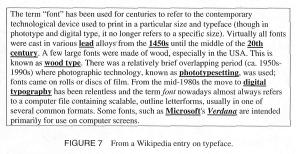 | |
| FIGURE 7 From a Wikipedia entry on typeface. |
The page in Figure 8 is essentially a three-column arrangement, with smaller modules worked out through the merging and splitting of cells. For the novice author, it is not necessary to produce such complex tables to see their design benefits. Even a two- or three-cell table is very useful for demonstrating such visual-rhetorical principles as the relationship between hierarchical structure and visual arrangement. Figures 9 and 10, for example, show the difference between a very simple layout with no table and one with a three-cell table. Simply reducing text line length, moving from a strictly vertical and serial layout to one that is more dynamic, and using a bit of color can help to improve the page's visual appeal, readability, and professionalism.
Advanced Pedagogical Approaches
When covering the basic technological tools for hypertext composition, it is important to convey to students the general idea that writing is a technology and thus that the ability to generate textual, pictorial, and navigational material must be complemented with the ability to wield a set of specific technological tools. This idea becomes even more important when students begin to approach more advanced hypertext composition problems. Such tools as CSS and interactive forms (discussed following) may appear to the student writer (or instructor) at first as not merely advanced but even beside the point of composing. However, such advanced tools as these provide hypertext authors the means to address visual and rhetorical problems with a great deal of sophistication. They should not be viewed as the exclusive province of Web development experts but rather as versatile and accessible features of the technology of writing.
 | |
| FIGURE 8 Illustration of invisible grid for layout using tables. Reproduced courtesy of CNN.com, 2004. |
CSS. Graduating from HTML-based formatting to CSS-based formatting is an important step for all hypertext authors. First, the concept of the style sheet reflects a long and well-established history of attention to textual and pictorial coherence in document design. CSS permits the development, for example, of typographic themes that can help to establish the document's overall persona (see Eva Brumberger's "The Persona of Typeface and Text" for a rich discussion of the topic). This coherence is not merely a matter of establishing a pleasing visual pattern; it has a profound effects on the reader's comprehension of the hypertext document's information structure. Typographers and document designers have long been familiar with the intimate relationship between matters of text format (e.g., type size and weight, line spacing, justification) and matters of document comprehension. Using CSS can help bring advanced students into more intimate contact with these issues.
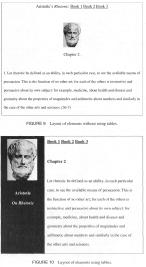 | |
| FIGURE 9 Layout of elements without using tables. |
| FIGURE 10 Layout of elements using tables. |
Second, the creativity and control permitted through the typographic capabilities of CSS is far greater than with conventional HTML. Most important among these is the ability to control text features such as character height and line spacing, border styles, positioning of text elements, as well as the appearance of hyperlinks. HTML allows some flexibility for character size, but in relative terms only, and it permits only two line spacing options: single or double spaced. Moreover, it provides no means to position text elements precisely or to apply borders and margins with any real flexibility. In addition, although HTML offers a few options for the appearance of hyperlinks, its method-declaring the font size and color of links in the opening body tag-forces all links on the page to look the same. CSS, in contrast, allows the author to designate the typographic features of any link or group of links.
CSS also helps to reinforce the student's attention to hierarchical structure, particularly because of the cascading principle. Although this principle is implicit in HTML, it is more important to understand how it works when using CSS. In HTML, hierarchy is required in the nesting of elements within the overall HTML document. Beyond that, novice authors need not know much more. One can set up a table with a blue background and then change the color of a few cells and their textual contents by fiddling directly with their attributes in whatever ways HTML allows.
With CSS, however, one does not fiddle directly with these attributes but, rather, creates style classes that function like disembodied packages of features that can then be attached to any element. In a CSS-based document, that is, the HTML is used primarily to structure elements, each of which can then be assigned any of the classes defined in the CSS document. The "cascading" comes into play when a particular element is assigned a style that is different from the larger element in which it is nested. In CSS, the smaller element's style declaration takes precedence and determines the style of all of those elements nested within it, unless they are assigned their own styles. Though HTML embodies this principle as well, CSS is a bit stricter in requiring it and at times trickier to tame.
Keeping structural elements and their attributes separate in this way is a key principle not only of CSS but of most advanced document authoring systems in which structure and content must be distinguished, such as those based on XML. Understanding this principle is thus not merely a matter of getting a grip on an advanced technique in Web design; it is a matter of becoming prepared for future learning in areas that are becoming increasingly central to technical communication.
In light of the features just described, one might expect CSS to be difficult to access and manipulate. In fact, although it may be considered an advanced technique, CSS is less intimidating to look at than HTML. CSS documents are both simpler in appearance and use a more natural-sounding vocabulary, and they can be edited in any plain text editor. Figure 11 shows a simple style declaration.
| FIGURE 11 Simple style declaration. |
As Figure 11 shows, only a few features in a style sheet-mainly the punctuation elements-might induce code anxiety in those new to CSS. Otherwise, the import of this simple declaration is not too intimidating: There is a style called "blurb-box" that is characterized by a few self-explanatory typographical features.
Nevertheless, CSS does present the hypertext author with a new layer of composing problems. CSS positioning declarations, for example, are less compatible across browsers than the sort of positioning HTML can achieve through the use of tables. Also, it can take some practice to understand how the cascading principle plays out in a document's rendering, particularly when one's style sheets become lengthy and complex. Therefore, even though some CSS is very easy to implement, I do not recommend requiring novice authors to use the system.
Interactive forms. Because they can be very useful in reinforcing the idea that the hypertext reading environment is not one of passive reception but one of active engagement, and that hypertext documents are part of a vast, interconnected docuverse, forms should be a part of any advanced instruction in hypertext document production. There are two general approaches to composing hypertexts that use forms. The first approach is a shortcut by which one can cut and paste snippets of material to be used in one's HTML code without knowing how the snippets do what they do. The second approach requires the study of at least the rudiments of a form-handling scripting system. Although the first is common and easy, I would argue that for advanced students of hypertext composition, it would be quite useful, and perhaps essential, to learn a bit of the kind of scripting system needed to produce one's own forms. For example, the rudiments of PHP are not difficult to learn, and it can be quite rewarding for students to experience the relative ease of composing interactive forms that they might otherwise consider (erroneously) to be the exclusive province of "programmers." (PHP originally stood for Personal Home Page, a system of scripts invented by Rasmus Lerdorf in 1995 to track how1 many people accessed his online resume. See <http://www.php.net/manual/en/history.php> for a history of PHP. Currently the full name of the scripting system is PHP: Hypertext Preprocessor.)
This kind of reward is worth more than the satisfaction of knowing that even a nonprogrammer can make a form work properly. It speaks, more generally, to the' idea that the technology of writing includes all of the technological tools for producing written documents. This does not mean that all writers must learn the intricacies of Web development languages. Rather, it means that all writers, especially composers of hypertext, should feel entitled to the knowledge needed to exercise the greatest control possible over the design and function of their works. Getting student writers to understand a bit of PHP (or any advanced scripting system), inr other words, means providing them with this knowledge in a democratic spirit.
Interactive forms are commonly used to collect some textural information from the user and pass this information to the e-mail account of the form's author. In the PHP environment, this kind of form requires two elements: one that produces the form on a Web page and one that passes the collected information to an e-mail address. Both can appear within the same HTML page. Figure 12 shows the first component.
In Figure 12, the form element is set up using simple HTML tags and includes a: few basic components: an opening and closing, the various input fields (name, e-mail, etc.), a handful of line breaks (<br>), and two items that will appear as a send and a reset button, respectively. When rendered, the form appears roughly as shown in Figure 13.
Figure 13 illustrates the fields that the user would fill out. The next step is toprocess this information so that it is useful for the author of the form; in this case, the information needs to be sent to the author's e-mail address. To accomplish this, step, the PHP script illustrated in Figure 14 can be used (and can be placed just after the form element in the HTML of the author's page).
Although the script in Figure 14 may look a bit daunting for those familiar only with the basics of HTML, it is fairly simple and logical. First, it contains an opening and closing (<?php> and <?>), which indicate to the server that a PHP script within an HTML document needs to be processed. The first if statement sets up a condition: If the send button (indicated by $submif) is pressed, do what comes next. In this case, what comes next happens to be to consider the second if statement; here, the question is whether all of the fields (name, subject, e-mail, message) have been filled out. Then, if these two conditions are met (the form is filled out and the send button is pressed), the script sends an e-maiJ to the address indicated (in this case <jlgordon@ ysu.edu>) using the information collected from the form. When the e-mail is sent, a Message Sent notification appears below the form; if the two conditions have not been met, though, a different message appears indicating as much.
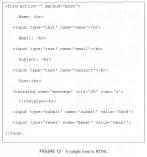 | |
| FIGURE 12 A sample form in HTML. |
For advanced hypertext authors, understanding how to produce such forms should not be especially difficult with a bit of instruction and study, and the possibilities for customization are vast. Such forms can be integrated into one's hypertext document to solicit responses to questions, to take online quizzes, to engage in collaborative writing activities, and so on. Forms can also be linked to a site under construction for usability testing by soliciting feedback and suggestions on the site's textual, pictorial, and navigational features. Like all of the techniques just discussed, the nitty-gritty of the scripting language should be viewed as an important component of the art of hypertext composition rather than as an esoteric programming language off limits to students of technical communication.
CONCLUSION
Teaching hypertext composition can be rewarding simply because having students write in a new medium creates excitement and challenges in the classroom. However, without a coherent conceptual framework, we run the risk of presenting hypertext composition as little more than a pedagogical novelty. My approach here has been to point out how the practice of hypertext composition, which I have treated in terms of Web page design, invokes a variety of important conceptual questions about the nature of electronic documents, about hierarchical structure and markup systems, and about visual rhetoric and intertextuality. In a sense, then, I have tried to approach the teaching of hypertext composition as an end in itself as well as a means to broader and deeper pedagogical objectives. At the same time, such conceptual considerations do not amount to much unless we can distill them into manageable curricular strategies so that we can prepare our students well for both the intellectual and practical challenges in technical communication. By insisting that student writers both should and can become sophisticated in the design of hypertext documents and in the wielding of the tools used to design them, we can go far in preparing them to meet these challenges.
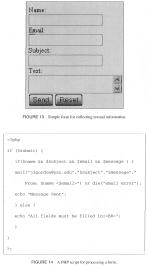 | |
| FIGURE 13 Simple form for collecting textual information. |
| FIGURE 14 A PHP script for processing a form. |
ACKNOWLEDGMENTS
The author thanks the two anonymous reviewers for their many helpful comments and suggestions.
| [Reference] » View reference page with links |
| WORKSCITED |
| Albers, Michael. "The Technical Editor and Document Databases: What the Future May Hold." TCQ 9.2: 191-206. |
| Allen, Graham. Intertextuality. New York: Routledge, 2000. |
| Aristotle. On Rhetoric. Trans. George A. Kennedy. New York: Oxford UP, 1991. 28-29. |
| Armbruster, B. B. (1984). "The Problem of 'inconsiderate text.'" Comprehension Instruction: Perspectives and Suggestions. Ed. G. G. Duffy, L. R. Roehler, and J. Mason. New York: Longman, 1984. 202-17. |
| Association for Computing Machinery. New York: ACM. 21 June 2004 <www.acm.org/dl.cfm>. |
| Brumberger, Eva. "The Persona of Typeface and Text." TC 50.2 (1999): 206-31. |
| Bush, Vannevar. "As We May Think." Atlantic Monthly. (July, 1945). Atlantic Online. 1 June 2004 <http://www.theatlantic.com/unbound/flashbks/computer/bushf.htm>. |
| Coombs, James H., Alien H. Renear, and Steven J. Derose. "Markup Systems and the Future of Scholarly Text Processing." Communications of the ACM 30.11 (1987): 933-47. |
| Flower, Linda. "Writer-Based Prose: A Cognitive Basis for Problems in Writing." CE 41.1: 19-37. |
| Hart-Davidson, William. "On Writing, Technical Communication, and Information Technology: The Core Competencies of Technical Communication." TC 48.2: 145-55. |
| McHoul, Alec, and Phil Roe. "Hypertext and Reading Cognition." |
| Murdoch University. 1996. 1 June 2004 <http://wwwmcc.murdoch.edu.au/ReadingRoom/VID/cognition.html>. |
| Miles, Adrian. "Hypertext Structure as the Event of Connection." Proceedings of the Twelfth ACM Conference on Hypertext and Hypermedia. Ârhus, Denmark, 2001. 61-68. 21 June 2004 <ACM.com>. Path: Digital Library. |
| Nelson, Ted. "Complex Information Processing: A File Structure for the Complex, the Changing and the Indeterminate." Proceedings of the 20th National Conference of the ACM. Cleveland: AMC Press, 1965. 84-100. <ACM.com>. Path: Digital Library. |
| Ong, Walter J. Orality and Literacy: The Technologizing of the Word. New York: Routledge, 1982. |
| Schriver, Karen. "Evaluating Text Quality: The Continuum from Text-Focused to Reader-Focused Methods." IEEETC 32.4 (December) 1989. 238-55. |
| Simon, Herbert A. "The Architecture of Complexity." Proceedings of the American Philosophical Society 106 (December, 1962). 467-82. Reprinted in Richard E. Young, Alton L. Backer, and Kenneth L. Pike. Rhetoric: Discovery and Change. New York: Harcourt, 1970. |
| TCQ. Special Issue on Techne. Ed. Tracy Bridgeford and Michael Moore. 11.2 (2002). |
| Wikipedia.org. 2001. 2 June 2004 <en.wikipedia.org/wiki/main_page>. |
| [Author Affiliation] |
| Jay L. Gordon |
| Youngstown State University |
| [Author Affiliation] |
| Jay L. Gordon is an assistant professor of English at Youngstown State University. His research interests include classical rhetoric, writing pedagogy, and document design. Currently he is writing a book on visual invention. |


 My Research